Wednesday, September 7, 2011

Auto Scrolling Text for Website or Blog

How to Make Auto Scrolling Marquee Text in your website or in your blog gadget Using HTML

All what you need to do is to copy this code to your html code after replacing (Your Lines) with your text. for blogger gadget- go to design and add a HTML\Java Script gadget and paste this code there.
Done :)

Code:

<div class="textwidget"><marquee direction="up" width="250" onmouseover="this.stop()" scrollamount="2" onmouseout="this.start()" height="200" align="center">
Your Lines
Your Lines
Your Lines
Your Lines
</marquee></div>

Demo:


Your Lines
Your Lines
Your Lines
Your Lines

Panasonic TDA200 Maintenance Console

Panasonic KX-TDA200 Maintenance Console Software


Tuesday, September 6, 2011

PBX Call Accounting Software

Wintarriff is a Call Accounting Software for PBX System. I've Installed it at my work and its connected to Panasonic KX-TDA 200 Through the Serial Port COM. Its compatible with many Models of PBX.


Features:


- Collect and process information about telephone calls.


- The program receives data from the office PBX about date or time of the phone call, duration, dialed number. 


- Stores data to the hard disk of the computer and uses it later in course of the processing. 


- Based on duration and dialed number, WinTariff calculates cost of the call and determines the direction (in case of the long-distance calls - the city which has been called). 


- The program builds up various reports (Crystal Report) - about all calls during the month, calls to a certain internal subscriber. 


- Based on data about the calls the program is able to calculate various statistical data - this data allows the user to analyze usage of the resources of the office PBX and to improve operation of your office.


Wintarrif Call Accounting System


Convert Videos Using VLC Player


How to Convert any video file using VLC Player without installing video converter software
If you dont have VLC Player you can download it from Here
  • Open VLC  player
  • Click on Media and select Convert / Save (Ctrl+R ) option.
  • under the Files tab click on Add button to select files that you want to convert.
  • vlc convert window Trick to Convert Videos Using VLC Player
  • You can also add subtitles which will be hardcoded to the converted file.To add subtitles check the Use a subtitle option.
  • Click on the browse button to give the path of the subtitles file and select the alignment and font size options.
  • Now Click on Convert/Save button this will open another window.
  • Select the Destination File and Profile( Conversion Format ).
  • vlc convert1 Trick to Convert Videos Using VLC Player
  • Click on the start button to begin conversion.

Panasonic PBX KX-TDA Manual

PDF Manuals files for Panasonic PBX System KX-TDA 200 and KX-TDA100 Maintenance:

Panasonic PBX KX-TDA 200
Feature Guide
Getting Started
Information IP-PT
Installation Manual
KX-TDA100 - 200 Spec Sheet
PC Programing Manual
PT Programing Manual
User Manual


Monday, September 5, 2011

Remove URL From Google Search


Today i will show you How to delete website link from google
If you have website or blog and you had many old deleted posts or pages. You will notice that they already removed but you still can find them when you search on Google because it's still indexed and you should de-index them otherwise the visitors will see error.

So if you created a page and you don’t want it to be indexed you can add this meta tag code

<html>
<head>
<title>...</title>
<META NAME="ROBOTS" CONTENT="NOINDEX, NOFOLLOW">
</head>

And if your page is already indexed. Then follow the next steps to remove it from Google:

Login to your Google Account.

Go to Google Webmaster Removal Tool

Now you will be on My Removal Request Page and click on the New Removal  Request.

Write the URL of link that you want to remove and click on continue.


Select any reason why you want to remove this link and click on Submit Button.

It will take some time like 2-3 days to completely de-index you URL from the results.


Sunday, September 4, 2011

Copy Text From Image

How to Copy Text From Any Picture Without OCR Software by using Microsoft OneNote


open Microsoft Office OneNote (Start–>All Programs–>Microsoft Office–>Microsoft Office OneNote).

Drag and Drop the image in the MS-OneNote window from which you want copy the text.
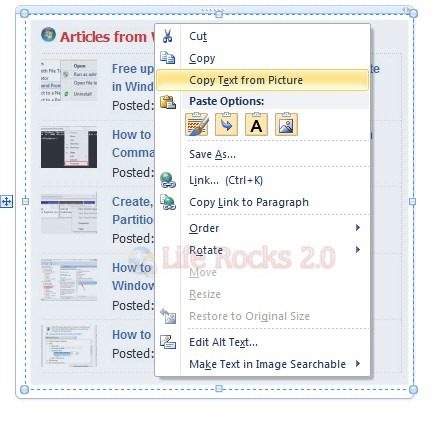
Now Right-Click on the image and select Copy Text From Picture option.


Microsoft OneNote

Open Notepad or MS-Office (where you want save the text) and paste the content there.


Now you have the whole text in your notepad or Ms-Office.You can edit or format it and save only the required excerpt.